Dynamic pricing for short-term rentals: simple rules to increase revenue without guessing
Setting a price and forgetting about it is the surest way to leave money on the table. With the right rules and the right tools, you can charge more during high-demand periods and fill more rooms during slow ones — completely automatically.
The problem with fixed pricing
Most independent properties start with a nightly rate and stick with it for weeks or months. They might drop it slightly in low season and raise it a bit in high season. But the logic is always manual, intuitive, and reactive.
The result is predictable: during high-demand periods they charge less than they could, and during slow periods they charge more than the market will accept. They lose on both ends.
Dynamic pricing isn't a complex strategy reserved for large hotel chains. It means charging differently based on demand, using clear rules instead of guessing.
The rules you can't skip
Before touching any tool, you need to be clear on which rules you're going to apply. These are the ones that make the difference between improvising and having a real strategy.
1. Set a floor and a ceiling
These are the two limits that protect your operation. The floor is the minimum rate below which it doesn't make sense to accept a booking — it needs to cover at least cleaning costs, variable expenses, and platform commission. The ceiling is the maximum your local market is willing to pay without generating rejections or bad reviews from unmet expectations.
All other rules work within that range. Without defined floors and ceilings, any automatic adjustment can push your rates to levels that make no sense at either extreme.
Example: if cleaning costs $3,500, variable costs add up to $800, commission is 15%, and you want at least $2,000 in margin, your floor should be around $7,400–$8,000 per night. Review it at least twice a year.
2. Use occupancy as your main trigger
Occupancy is the most direct signal of demand. When your property is close to full, rates should go up. When availability is high, rates should drop or stay competitive to avoid losing nights.
This is the core logic of hotel revenue management: you don't adjust rates based on instinct — you adjust them based on what the market is doing in real time. For example: if your occupancy exceeds 75%, the rate automatically increases by 20%. If it drops below 25%, it decreases by 15% to recover demand.
3. Map out your seasons
Seasonality is the second driver of rate variation. You need an annual map that defines when low, mid, high, and peak season are for your specific property. This map lets you set different base rate ranges for each period, on top of which occupancy-based adjustments are then applied.
| Season | Description | Base rate reference |
|---|---|---|
| Low | Minimum demand, high availability in the area | Base rate × 0.75 – 0.85 |
| Mid | Stable and predictable demand | Base rate × 1.0 |
| High | Strong demand, low availability in the area | Base rate × 1.3 – 1.6 |
| Peak | Exceptional demand (long weekends, events) | Base rate × 1.8 – 2.5 |
4. Get ahead of events
Events are the clearest opportunity — and the easiest one to miss. A long weekend, a festival, a game, or a conference can multiply demand in your area within a 2 to 5-day window. If your rate doesn't go up before the local supply fills up, someone else captures that revenue.
5. Apply day-of-week rules
Demand isn't uniform throughout the week. In leisure destinations, Fridays and Saturdays concentrate the highest demand. For properties focused on business travelers, Monday through Thursday are the strong days. Identifying your property's pattern lets you charge more on peak days without losing occupancy on slower ones.
6. Manage booking lead time
A reservation made 60 days out has a different operational value than one made 3 days before check-in. With plenty of lead time, you can still find another guest if something falls through. With little lead time, you either take it or the date stays empty. Setting up automatic adjustments based on days until check-in — higher rates for early bookings and last-minute discounts as the date approaches without a reservation — improves occupancy without unnecessarily sacrificing rate.
7. Don't leave gap nights uncovered
Gap nights are the nights left between two reservations that no guest can book because they don't meet the minimum stay requirement. They're silent losses — and completely avoidable. The solution is to set flexible minimum stays that automatically adapt when short gaps appear, and apply a specific discount on those nights to make them attractive on the platforms.
How to set up Yield Manager in MiniHotel
MiniHotel includes a native Yield Management module that lets you apply all these rules automatically. Once configured, the system adjusts rates based on your property's actual occupancy and syncs them in real time with the Channel Manager and Booking Engine — without you having to step in for every reservation or remember to update prices before a holiday.
From the main menu in MiniHotel, go to the Prices & Availability section. There you'll find the Yield Manager button to enter the module.
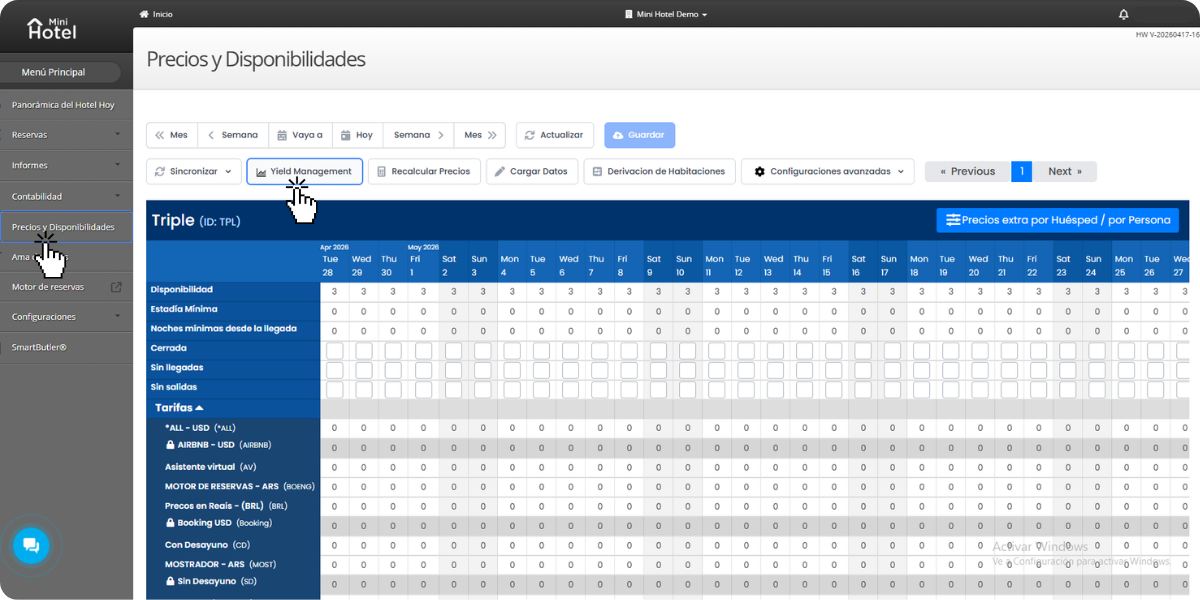
Once inside, you'll see the list of active Yield Rules for your property. From here you can view, edit, and delete existing rules, or create new ones using the + Add button.
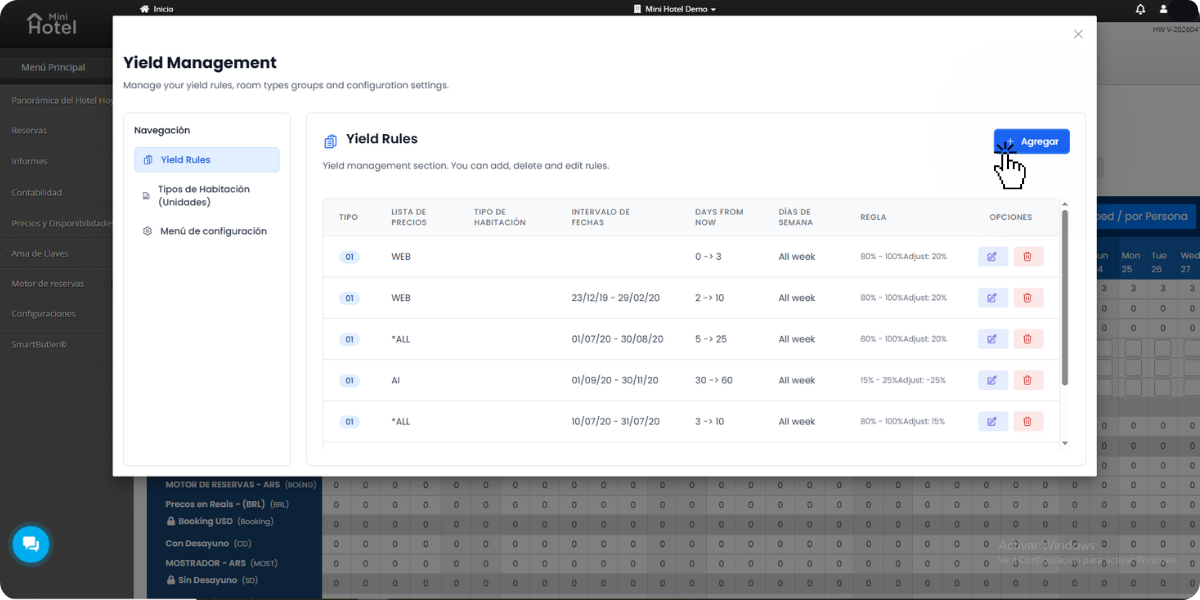
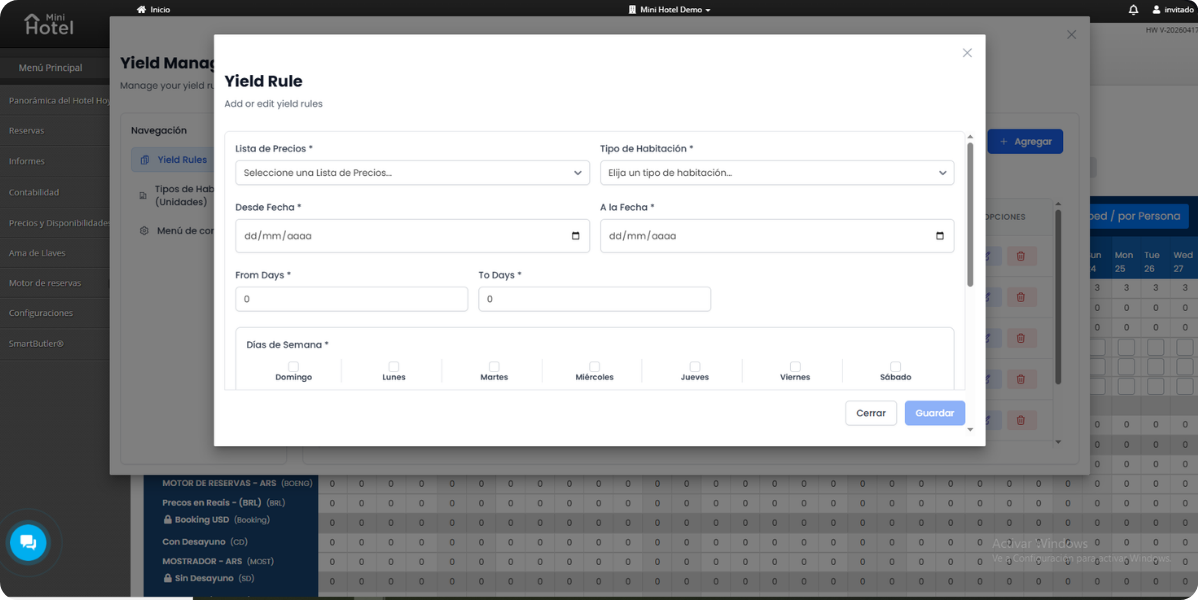
Clicking + Add opens the creation form. Each rule combines several parameters that define when it applies and how it adjusts the rate:
- Price List: the base rate the adjustment is applied to (WEB, AI, or other lists configured in your account).
- Room Type: you can apply the rule to a specific room type or to all of them (*ALL).
- Date Range: the period during which the rule is active. Ideal for seasons or specific events.
- Days From Now: defines how many days in advance the reservation is being made relative to the check-in date. For example, if a guest books today for a check-in in 3 days, the value is 3. If they book for 45 days from now, the value is 45. This parameter lets you create last-minute rules — lowering the rate when only a few days remain and rooms are still available — or early booking rules, adjusting the rate for reservations made well in advance.
- Days of the Week: you can limit the rule to specific days or apply it across the entire week.
This is the core of the Yield Manager. Each rule can have up to 4 occupancy ranges, each with its own rate adjustment. The fields are:
- From %: the occupancy percentage at which the range starts.
- To %: the occupancy percentage at which the range ends.
- Adjust %: the adjustment applied when occupancy falls within that range. A positive value raises the rate; a negative value lowers it.
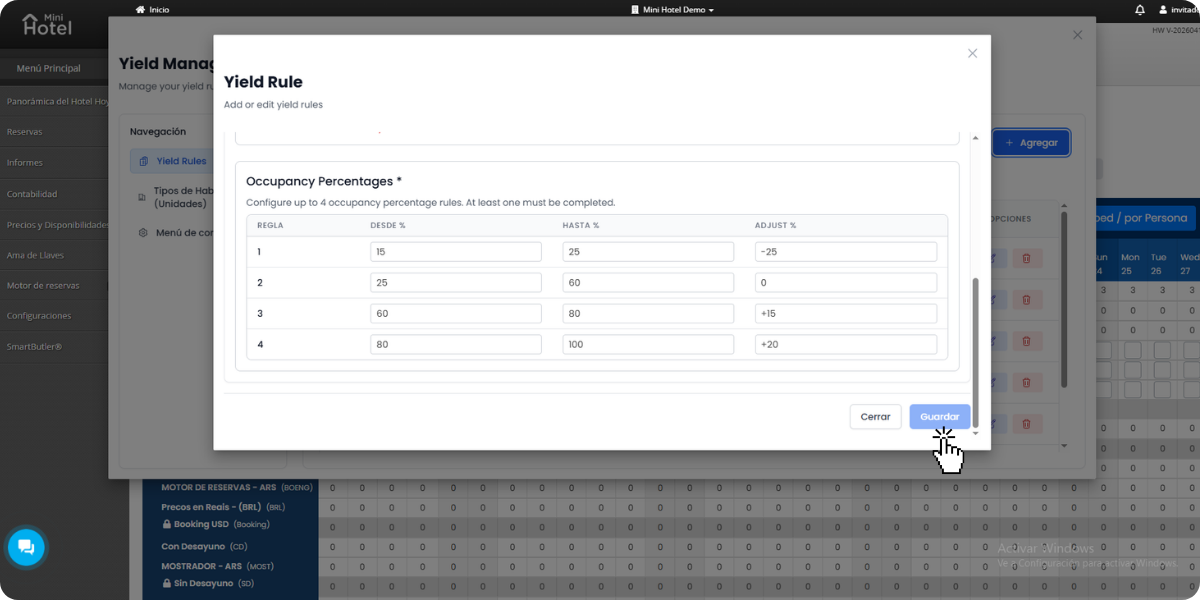
Once all fields are filled in, click Save. The rule becomes active immediately.
Once the rule is saved, MiniHotel takes care of the rest. The Yield Manager is connected to the Channel Manager and the Booking Engine: every time occupancy crosses a defined threshold, the rate adjustment is automatically pushed to all your distribution channels — Booking.com, Airbnb, Expedia, and your direct website.
No need to log into each platform. No need to remember to update rates before a holiday or event. The system handles it on its own, in real time, based on the rules you set up once.
Want to go further? RMS options in the Marketplace
MiniHotel's native Yield Manager is enough for most independent properties. But if your operation has grown or you want an extra layer of intelligence — with competitive data, market demand signals, and more advanced algorithms — MiniHotel integrates with the leading Revenue Management Systems available.

One of the most recognized revenue management companies in the Spanish-speaking market. It combines rates, cancellation policies, and distribution strategy in a single platform, with a comprehensive approach designed for independent hotels that want to professionalize their revenue without building a dedicated team.

A dynamic pricing platform with algorithms built specifically for short-term rentals. It detects local events and trends, recommends rates based on real-time supply and demand, and connects with Airbnb, VRBO, and other channels. It also lets you manage minimum stays, discounts, and availability from one place.

Focused on optimizing direct bookings through digital solutions integrated into the hotelier's workflow. It combines technology and hospitality with the goal of reducing OTA dependency and improving profitability through the direct channel.

An automated system that runs 24/7 without manual input. Their data shows an average revenue increase of +30% across properties using the platform. With over 4,000 active hotels in Europe, it's one of the most established options in the segment for operators who want full rate automation.

An AI-powered commercial intelligence platform built specifically for independent hotels. It analyzes demand patterns, booking data, seasonality, and local events to generate real-time forecasts and rate recommendations. It integrates with the PMS and automatically updates prices and restrictions across all channels, with no complex manual work required.
Start applying dynamic pricing today
MiniHotel's Yield Manager is included in the Standard and Professional plans. Set up your rules once and the system automatically adjusts rates across all your channels based on your property's real occupancy.
Discover MiniHotel →