Why your guests don't complete their booking online (and what to check in your booking engine)
Five points where a guest usually leaves a booking half done, and a 10-minute check you can run from your phone.
A guest lands on your website, picks dates, looks at the rooms and starts to book. At some point, they close the tab. That is an abandoned booking: a person who wanted to book and did not complete the process.
In a small property, every abandonment is a direct booking that does not happen, and a direct booking is a booking with no intermediary commission. If you want to see other ways to get more of them, here is a guide on how to increase bookings.
This article walks through five common frictions behind booking abandonment, how to spot them in your own engine and what to fix. Then comes a 10-minute check you can do with a test booking from your phone and, if you decide to change systems, five options with their own booking engine to compare.
Where the guest gets lost
An online booking has five moments. The guest can leave at any of them, and each one has different causes.
- Search. They arrive from your website or from the free booking links on Google Hotels and check availability.
- Room. They compare rooms and rates.
- Details. They fill in their name, contact details and other information.
- Payment. They choose how to pay or how to guarantee the booking.
- Confirmation. They review the booking and wait for it to be confirmed.
Five frictions that make guests leave
There are no universal abandonment figures: they depend on your audience, your season and your engine. That is why it is better to review your own journey than to rely on averages.
1. The final price shows up late
The guest sees a price per night in the gallery, chooses, and later the total is higher because of taxes, fees or services that were not included. The problem is not that the price is high: it is that it changes when the guest had already decided.
Scenario (example figures)
A guest searches for 2 nights. In the gallery they see $1,000 per night, which makes $2,000. In the booking summary the total is $2,320, because $320 in taxes are added. They had already chosen the room, but the number changed and they start to wonder whether there will be more charges later.
How to spot it. Make a test booking, without confirming it, and compare the gallery price with the total on the last step. If they do not match, note each difference and the moment it appears.
How to fix it. Include taxes in the rate or state explicitly, in the rate description, what is included and what is not. The guest should know from the first screen.
How MiniHotel's Booking Engine handles it
When choosing a rate in the Booking Engine, the guest sees the price per night and the total for the stay, and each rate states what it includes, for example with or without breakfast. If the property has taxes configured, the booking summary shows them on a separate line, together with the subtotal, discounts and total, before confirming.
2. Too many steps or fields
Every extra field is a chance for the guest to leave it for later, especially on a phone. Sometimes the form asks for data the hotel does not need to confirm the booking, or spreads across several screens what could go together.
How to spot it. Count the steps and fields from the search to the confirmation. Mark the ones you do not use at the front desk.
How to fix it. Keep only the data needed to confirm and ask for the rest at check-in. If you host families or groups, check that they can book two or more rooms in a single process and do not have to make one booking per room.
How MiniHotel's Booking Engine handles it
The Booking Engine organizes the booking in three steps: Your stay, Guest details and Review. It also lets guests book more than one room in the same process: the guest adds rooms in the search box (for example, 2 rooms and 4 guests) and indicates the adults, children and infants for each one.
3. Payment does not adapt to the guest
Some guests are not ready to pay at the moment of booking: they want to confirm first, have doubts about the payment method or prefer not to advance money. If the process demands immediate payment or a separate transfer, some of them leave. These are three options, from least to most friction:
- Card guarantee, with no upfront payment. The guest leaves the details of a card that backs the booking and does not pay to book. It is the option that creates the least friction.
- Online payment, partial or full. It lowers the risk for the hotel, but it requires the guest's payment method to be available in your payment gateway.
- Deposit by bank transfer. For example, 50% to confirm. The guest leaves the process to pay and the booking stays pending until the money arrives. It is a valid decision for the hotel, but every step outside the engine is a chance for the guest not to continue, and that can cost you bookings.
The cost of a card guarantee
Since no payment is required, this option can increase the no-show rate, that is, the guests who book and do not show up. To balance it, define a clear cancellation and no-show policy, visible before booking, and consider sending a reminder before arrival. There is no single right option: it depends on your season and on how much each risk weighs in your operation.
How to spot it. Review which payment methods you offer and compare them with the ones your guests use: they change from one country to another and from one type of traveler to another. Make a test booking and note at what point they ask for money and in what form.
How to fix it. If your operation allows it, offer at least one option that does not require paying at the moment of booking.
How MiniHotel's Booking Engine handles it
In the Booking Engine, the property can use a credit card as a guarantee to confirm the booking. The engine states that transactions are encrypted by external payment providers. The payment methods and conditions defined by the hotel are shown before the guest completes the booking details, and the cancellation and no-show conditions are set by each property.
4. The mobile experience and the guest's language
Many guests search and book from their phone. Small buttons, long forms, calendars that are hard to use or a page that is slow to load make the guest give up halfway.
Also, not all guests read the language of your website. If you receive travelers from other countries, an engine that is in a single language forces them to translate every step on their own, and a currency they do not recognize makes it harder to compare prices.
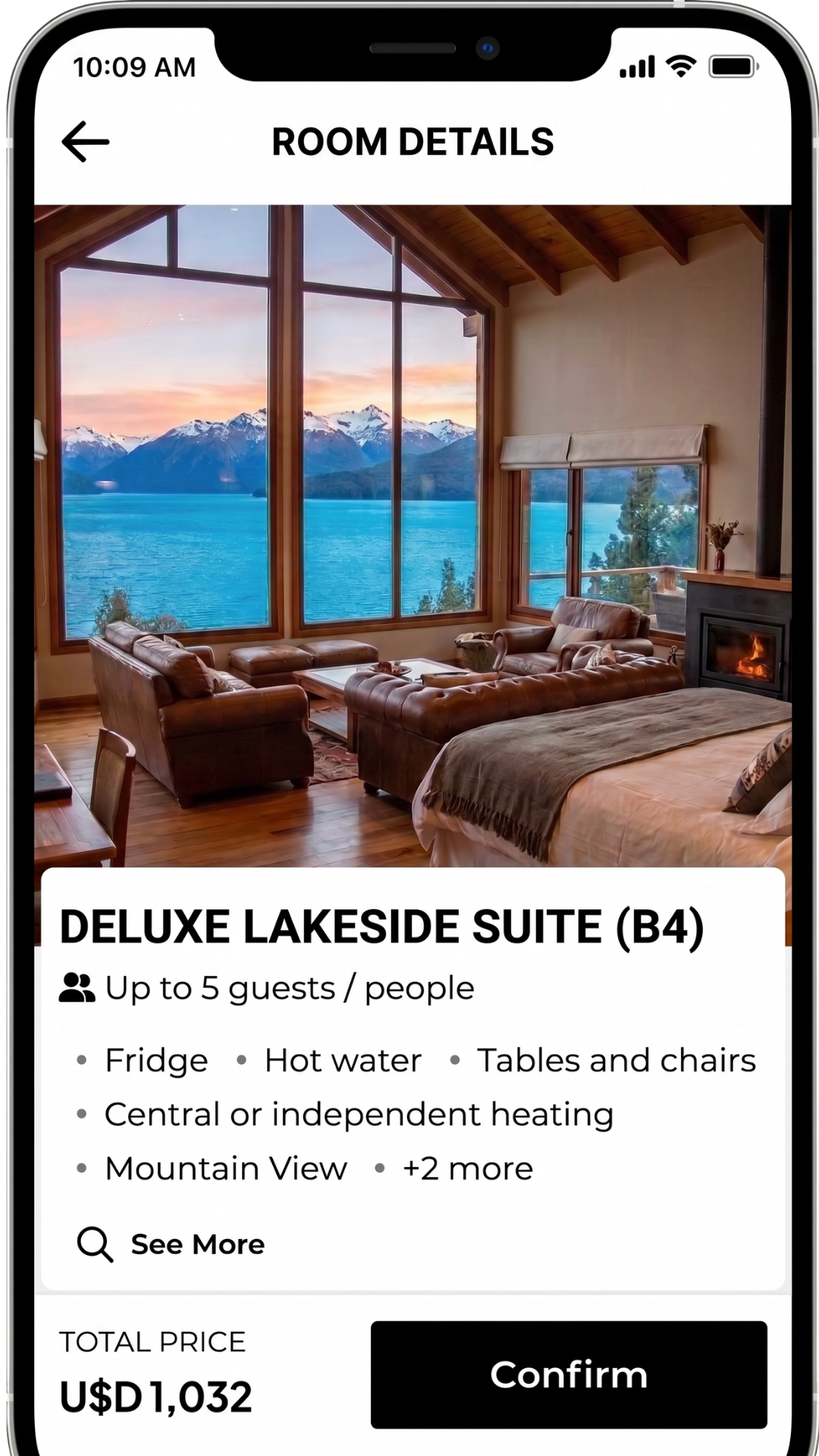
How to spot it. Open your engine on a real phone, using mobile data and not just a computer's reduced screen. Try to book with one hand: can you reach the final button without zooming? Then change the language and the currency and go through the process again: does everything get translated, from the search box to the form and the cancellation policy?
How to fix it. Simplify the form, and check button size and loading speed. Offer the engine in the languages of your main markets and make sure the texts you load yourself, such as room descriptions, rates and policies, are translated.
How MiniHotel's Booking Engine handles it
The Booking Engine adapts to the phone: a fixed bottom bar shows the total and the button to continue. It is also available in several languages and currencies, which the guest changes from a selector on the same screen to book in the language they understand best.
5. Unclear cancellation and confirmation
Before booking, the guest wants to know what happens if their plans change. If the policy cannot be found, is not understood or is not loaded, the doubt goes unanswered. And after booking, if a clear confirmation does not arrive, the guest is left unsure whether the booking went through.
How to spot it. Look at the policy as the guest sees it: can it be found without searching? Is it understood in one read? Make a test booking and check the confirmation email: dates, room type, cancellation policy and contact details.
How to fix it. Load the policy in each rate, with clear deadlines and simple words. Check that the confirmation includes what the guest needs to arrive.
How MiniHotel's Booking Engine handles it
In the Booking Engine, each rate has a link to "Details and cancellation policies", and the form states that a confirmation email will be sent to the guest's address.
A 10-minute check from your phone
Make a test booking, without confirming it, from a real phone. As you go, note at what point you would hesitate as a guest.
If you repeated the booking as a guest, at what point would you leave it? Write down the answer: that is your first improvement.
Five systems with their own booking engine
If the check shows that your current engine limits your bookings, these are five systems that include their own booking engine. It is not a ranking: all of them are described with the same points.
Data may vary: confirm it with each provider before deciding.
Cloudbeds
What it is. A hotel management platform with PMS, channel manager and booking engine built in.
Who it is for. Hotels, property groups, hostels, short-term rentals and B&Bs, according to its website.
Its booking engine. It presents it as an engine for direct bookings with no OTA commissions, with a mobile-first design, card payments, several languages and currencies, and visible cancellation policies.
Worth keeping in mind. Its page does not detail the card guarantee or whether a group can book more than one room in the same process. It is worth confirming with the provider.
MiniHotel
What it is. A cloud PMS with channel manager and Booking Engine built in.
Who it is for. Small hotels, hostels and independent properties, with a focus on Latin America.
Its booking engine. Three-step booking, additional rooms in the same search box (for example, 2 rooms and 4 guests, with the adults, children and infants for each one), several languages and currencies with a selector on the same screen, price per night and total for the stay before asking for details, and card guarantee as a configurable method. According to its website, it also supports coupons, multiple rates, customizable design and online payments through gateways such as MercadoPago and Stripe.
Worth keeping in mind. According to MiniHotel's pricing page, the booking engine appears in the Standard and Professional plans.
Mews
What it is. A cloud hotel management platform with a booking engine integrated into the PMS.
Who it is for. Hotels and other types of property, according to its website.
Its booking engine. Payments inside the booking flow, PCI compliant and with tokenized data, booking in the guest's language and currency, real-time availability and sale of add-ons during the booking, such as parking or early check-in.
Worth keeping in mind. Its page does not mention the card guarantee or whether a group can book more than one room in the same process. It is worth confirming with the provider.
D-EDGE
What it is. A hotel technology and marketing provider. Its booking engine is part of its central reservation system family and of an ecosystem of more than 500 integrations.
Who it is for. Its page presents it as optimized for groups with several properties.
Its booking engine. Three-step checkout, mobile-first design, more than 39 languages, global and local payment methods, Apple Pay and Google Pay, and a pre-booking option that is confirmed later.
Worth keeping in mind. Its page does not mention independent hotels or whether a group can book more than one room in the same process. If you have a single property, confirm with the provider whether it fits your size.
SiteMinder
What it is. A hotel commerce platform. Its Booking Engine is part of it.
Who it is for. Independent hotels and groups with several properties, with a specific engine for groups. For B&Bs and guesthouses it mentions another product, Little Hotelier.
Its booking engine. Three-step booking optimized for any device, a calendar that allows booking more than one room in the same process, more than 20 languages and currencies, and a PCI DSS compliant payment gateway.
Worth keeping in mind. Its page does not mention the card guarantee. According to its FAQ, the price depends on the number of rooms.
Five questions to compare any system
They are the same five frictions in this article, turned into questions for the provider:
- Does the gallery price include taxes, and is the final total visible before asking for details?
- How many steps does the booking have, and can a group book two or more rooms in the same process, or does it have to make one booking per room?
- Which payment options does it support: card guarantee, deposit or full online payment?
- Does it work well on a phone, and is it available in your guests' languages and currencies?
- Does it show the cancellation policy on each rate and send the confirmation by email?
Frequently asked questions
My guests check availability but almost never book. Where do I start?
Start with the 10-minute check: make a test booking from your phone and note at what point you would hesitate as a guest. Fix the point that raised the most doubts first, before changing several things at once.
Should I ask for upfront payment or leave the booking with a card guarantee?
There is no single answer. A card guarantee reduces friction for the guest, but it can increase no-shows. Upfront payment reduces that risk, but it requires the guest to have a payment method available and can make some of them drop off. What matters is choosing with a clear cancellation policy and reviewing the results of your season.
A guest travels with their family and needs two rooms. Do they have to book twice?
It depends on the booking engine. In MiniHotel's Booking Engine the guest can add a second room in the same search box (for example, 2 rooms and 4 guests) and indicate the adults, children and infants for each one. They do not need to make two bookings.
Almost all my bookings come from external platforms. Is it worth improving my booking engine?
Yes, if you want more inquiries from your own website to end in direct bookings, which do not pay intermediary commission. Improving the journey helps you not lose the guest who already reached your engine. To think about how to attract more inquiries, see the guide on how to increase bookings.
How do I know how many bookings I am losing?
To know it exactly, your analytics tool has to record every step of the engine. If you do not have it set up, compare availability searches with confirmed bookings over a period and repeat the 10-minute check. That way you identify where the friction is even without the number.
Try MiniHotel free for 7 days
If you want to see how the system works in your property, you can try MiniHotel free for 7 days.
Try MiniHotel free for 7 days